UE5 Global Blueprint Functions
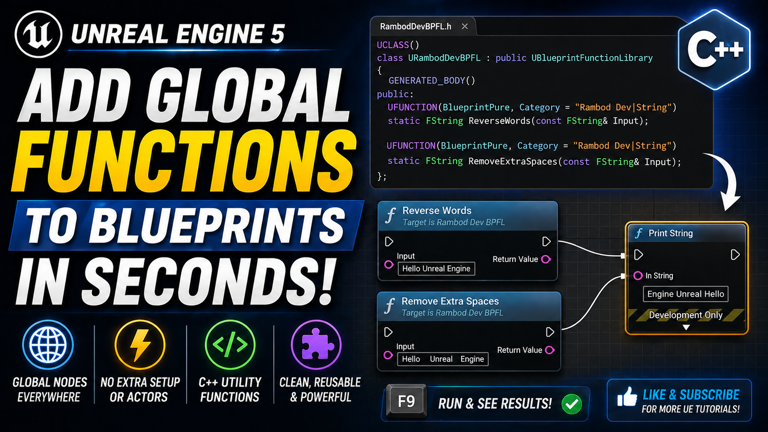
Repeating the same Blueprint logic across multiple actors, widgets, or systems is one of the fastest ways to make an Unreal project messy. The problem gets worse when the logic is something basic and reusable, like string cleanup, math helpers, formatting tools, validation checks, or small utility operations.
In this tutorial, you will learn how to create global Blueprint functions in Unreal Engine using a C++ Blueprint Function Library. These functions become available as Blueprint nodes across your entire project without needing an actor, component, parent class, or object reference.
This is one of the cleanest ways to add reusable utility nodes to Unreal. It is simple, fast, and extremely useful once your project starts growing.
Watch the full video on YouTube: Add Global Functions To Blueprints In Seconds!
Related tutorial page: Blueprint Function Library Tutorial on rambod.net
Unreal Engine documentation: Official Unreal Engine Docs
Subscribe for more Unreal Engine tutorials: Rambod YouTube Channel
What You Will Build
- A C++ Blueprint Function Library
- Reusable global Blueprint nodes
- A Remove Extra Spaces string utility function
- A Reverse Words string utility function
- Custom Blueprint node categories for cleaner search
- A quick Level Blueprint test using input and Print String
Why Blueprint Function Libraries Matter
Blueprint Function Libraries solve a very specific problem: reusable logic that should be available everywhere.
Without a function library, developers often do one of these bad things:
- copy the same Blueprint nodes into multiple Blueprints
- create unnecessary actors just to access helper logic
- force unrelated classes to inherit from a shared parent
- build messy Blueprint graphs for simple utility behavior
That is bad architecture. It works for five minutes, then it becomes technical debt.
A Blueprint Function Library gives you one clean place for reusable tools. Once compiled, the functions appear as normal Blueprint nodes anywhere in your project.
What Makes a Function Library Different
A Blueprint Function Library does not represent an object in the world. It is not an Actor. It is not a Component. It is not something you drag into a level.
It is simply a class that stores static utility functions.
That means:
- no spawn logic
- no component setup
- no object reference required
- no inheritance requirement
- no duplicated Blueprint spaghetti
You write the function once, compile, and then use it globally.
Good Use Cases for Global Blueprint Functions
Blueprint Function Libraries are excellent for small, reusable helpers.
Common examples include:
- string cleanup
- text formatting
- math helpers
- vector calculations
- array utilities
- data conversion
- validation checks
- debug helpers
- gameplay calculation utilities
The rule is simple: if the logic is reusable and does not need actor state, it may be a good candidate for a function library.
Step 1: Create a New C++ Class
Start inside Unreal Engine and open the C++ class wizard.
Go to:
Tools → New C++ ClassSwitch to:
All ClassesThen search for:
Blueprint Function LibrarySelect it and continue.
Step 2: Name the Function Library
You can keep the default name for quick testing, but in a real project you should use something clear.
Example names:
RambodBlueprintFunctionLibrary
GameUtilityLibrary
StringUtilityLibrary
ProjectBlueprintLibrary
For a general-purpose project utility library, a name like this works well:
RambodBlueprintFunctionLibraryAfter creating it, Unreal generates a header file and a source file.
Why the Parent Class Must Be Blueprint Function Library
The parent class matters. Do not randomly pick Actor, Object, or Component for this kind of utility.
You want:
UBlueprintFunctionLibrarybecause this class type is designed specifically for exposing static C++ functions as Blueprint nodes.
Pick the wrong parent and you are making the job harder for no benefit.
Step 3: Add the First Function Declaration
Open the generated header file.
Inside the public section, declare your first utility function:
UFUNCTION(BlueprintPure, Category="Rambod Dev|Utility|String")
static FString RemoveExtraSpaces(const FString& InputString);
This function will remove duplicate spaces and trim the final string.
What UFUNCTION Means
The UFUNCTION macro tells Unreal’s reflection system about your C++ function.
Without it, Unreal does not expose the function to Blueprints.
This is not optional. If you want the function visible as a Blueprint node, you need UFUNCTION.
What BlueprintPure Means
BlueprintPure means the function does not change game state.
A pure Blueprint node:
- has no execution pins
- returns a value directly
- is best for calculations and conversions
String cleanup is a perfect example. It takes an input string and returns a cleaned string. It does not need to modify the world, spawn actors, save files, or trigger gameplay side effects.
What Static Means
Static means the function belongs to the class itself, not to an instance of the class.
That is why Blueprint Function Library functions can be called globally.
You do not need to spawn anything. You do not need to create a variable reference. You just call the node.
Why Category Matters
The category controls where the node appears in the Blueprint search menu.
This category:
Category="Rambod Dev|Utility|String"creates a nice grouped path in the Blueprint context menu.
Good categories matter when your utility library grows. If you dump everything into one vague category, your own tools become annoying to find.
Step 4: Add a Reverse Words Function
Add a second function declaration under the first one:
UFUNCTION(BlueprintPure, Category="Rambod Dev|Utility|String")
static FString ReverseWords(const FString& InputString);
This function will take a sentence, clean extra spaces, split it into words, reverse the word order, and return the final string.
For example:
Hello Unreal Enginebecomes:
Engine Unreal HelloStep 5: Include the Reverse Algorithm Header
In the CPP file, include Unreal’s algorithm helper for reversing arrays:
#include "Algo/Reverse.h"This lets you use:
Algo::Reverseon an array of words.
Step 6: Implement Remove Extra Spaces
In the CPP file, implement the first function:
FString URambodBlueprintFunctionLibrary::RemoveExtraSpaces(const FString& InputString)
{
    FString Cleaned;
    bool bLastWasSpace = true;

    for (TCHAR Ch : InputString)
    {
        if (FChar::IsWhitespace(Ch))
        {
            if (!bLastWasSpace)
            {
                Cleaned.AppendChar(TEXT(' '));
                bLastWasSpace = true;
            }
        }
        else
        {
            Cleaned.AppendChar(Ch);
            bLastWasSpace = false;
        }
    }

    Cleaned.TrimStartAndEndInline();
    return Cleaned;
}
Replace URambodBlueprintFunctionLibrary with the actual class name generated in your project.
How Remove Extra Spaces Works
The logic loops through every character in the input string.
It tracks whether the previous character was whitespace. If multiple spaces appear in a row, it only keeps one.
At the end, it trims the result so leading and trailing spaces are removed.
This is a small example, but it teaches an important pattern: write the utility once in C++, then call it anywhere in Blueprint.
Step 7: Implement Reverse Words
Now implement the second function:
FString URambodBlueprintFunctionLibrary::ReverseWords(const FString& InputString)
{
    FString Clean = RemoveExtraSpaces(InputString);

    TArray<FString> Words;
    Clean.ParseIntoArray(Words, TEXT(" "), true);

    Algo::Reverse(Words);

    return FString::Join(Words, TEXT(" "));
}
Again, replace the class name with your real class name.
How Reverse Words Works
The Reverse Words function is built in clear stages:
- Clean the string using Remove Extra Spaces.
- Split the cleaned string into words.
- Reverse the word array.
- Join the words back into a single string.
This shows how function libraries can also call other functions from the same library. That is useful because it lets you build utility layers instead of duplicating cleanup logic everywhere.
Step 8: Build the Project
Save the files and build the project from your IDE.
If the build succeeds, Unreal’s reflection system will expose the new functions to Blueprint.
If Unreal is already open, you may need to refresh, compile, or restart depending on your setup.
Step 9: Test the Nodes in Level Blueprint
Open the Level Blueprint.
Add a simple key input event, for example:
W KeyThen right-click and search for your category:
Rambod DevYou should see your utility functions appear as Blueprint nodes.
Step 10: Test Reverse Words with Print String
Add the Reverse Words node and give it a test string:
Hello Unreal EngineConnect the output to:
Print StringPress Play and trigger the key input.
You should see:
Engine Unreal Helloprinted on screen.
Why This Is Better Than Copying Blueprint Logic
Copying logic between Blueprints is beginner-friendly in the worst possible way. It feels fast at first, then becomes a maintenance problem.
A function library is better because:
- one function has one source of truth
- bugs are fixed in one place
- nodes stay reusable
- Blueprint graphs stay cleaner
- teams can standardize common utilities
This is basic architecture discipline. Use it early.
BlueprintPure vs BlueprintCallable
Use BlueprintPure when the function only calculates and returns a value.
Use BlueprintCallable when the function performs an action that changes state or needs execution pins.
Examples:
- BlueprintPure: format text, clean string, calculate distance, convert data
- BlueprintCallable: spawn actor, save data, send request, modify object state
Choosing the correct type keeps your Blueprint nodes clearer and more honest.
When Not to Use a Blueprint Function Library
Function libraries are powerful, but they are not the answer to everything.
Do not use them for logic that depends heavily on actor state, world ownership, components, animation state, or long-running gameplay behavior.
For those, consider:
- Actor Components
- Subsystems
- proper gameplay classes
- interfaces
- service-style manager objects
A function library is best for utility logic, not for turning your project into a pile of global shortcuts.
Good Naming Practices
Utility functions should be named clearly.
Good names:
- RemoveExtraSpaces
- ReverseWords
- FormatPlayerName
- ClampHealthPercent
- ConvertSecondsToTimeText
Bad names:
- FixString
- DoThing
- MyFunc
- UtilityOne
Bad names are lazy. They make the Blueprint search menu worse and your future self will hate you for it.
Common Problem: Node Does Not Appear in Blueprint
If your function does not appear in Blueprint, check:
- Did the project compile successfully?
- Did you add UFUNCTION?
- Is the function public?
- Is the function static?
- Is the class derived from Blueprint Function Library?
- Did you restart Unreal if reflection did not refresh?
The most common mistake is missing the UFUNCTION macro or forgetting static.
Common Problem: Build Fails After Adding Code
If the build fails, check:
- class name matches the generated class
- function declarations match implementations exactly
- header includes are correct
- semicolons are not missing
- the CPP function uses the correct class scope
C++ is not forgiving. That is the deal. Be precise.
Common Problem: Function Shows But Acts Wrong
If the node appears but the result is wrong, test the function with simple input first.
For string helpers, use obvious test strings like:
Hello Unreal Engineand confirm the expected output before using it inside a larger Blueprint system.
How This Scales in Real Projects
In a real Unreal project, you may eventually split utilities into multiple libraries:
- StringUtilityLibrary
- MathUtilityLibrary
- UIUtilityLibrary
- GameplayUtilityLibrary
- DebugUtilityLibrary
That keeps the node menu clean and prevents one giant utility class from turning into a junk drawer.
Why C++ Is Useful Even for Blueprint Developers
You do not need to rewrite your whole game in C++ to benefit from C++.
One of the best beginner-friendly uses of C++ in Unreal is creating clean helper nodes that make Blueprints easier to work with.
This is a smart hybrid workflow:
- C++ handles reusable utility logic
- Blueprints handle visual gameplay wiring
- the project stays cleaner than either approach alone
Conclusion
In this tutorial, you created a C++ Blueprint Function Library, declared static BlueprintPure utility functions, organized them under a custom Blueprint category, implemented Remove Extra Spaces and Reverse Words in C++, built the project, and tested the new global nodes inside Level Blueprint.
This is one of the fastest ways to add reusable tools to Unreal Engine and reduce duplicated Blueprint logic across your project.
Watch the full tutorial on YouTube: Add Global Functions To Blueprints In Seconds!
Read the related tutorial page: Blueprint Function Library Tutorial
Subscribe for more Unreal Engine tutorials: Subscribe to Rambod on YouTube
Resources
Frequently Asked Questions
What is a Blueprint Function Library in Unreal Engine?
A Blueprint Function Library is a C++ class used to expose static utility functions as Blueprint nodes that can be called globally across the project.
Do Blueprint Function Library functions need to be static?
Yes. Functions in a Blueprint Function Library should be static because they are called without creating an object instance.
What is the difference between BlueprintPure and BlueprintCallable?
BlueprintPure is for functions that calculate and return values without changing game state. BlueprintCallable is for functions that perform actions and need execution pins.
Can I use Blueprint Function Libraries for gameplay logic?
Use them for reusable utility logic. For stateful gameplay behavior, Actor Components, subsystems, interfaces, or regular gameplay classes are usually better.
Why does my C++ function not appear in Blueprint?
Usually because the function is missing UFUNCTION, is not public, is not static, did not compile, or the editor needs to refresh reflection data.
Can Blueprint Function Libraries help reduce Blueprint spaghetti?
Yes. They are useful for moving repeated utility logic into clean reusable nodes instead of duplicating the same Blueprint graph everywhere.

Related Tutorials
More lessons connected by category, tags, engine version, or implementation type.